Had a scare last night…
Out of no where, after restarting my computer after installing some windows updates my computers performance went to shit. My heart fell into my feet and I was feeling pretty nauseated about watching my computer start up for about 8 minutes when it usually takes less than 8 seconds to get to the windows login screen. I think that the windows updates were just a coincidence, but my PC definitely was having a problem after this last restart.
I will admit right now, I hate this area of IT work, I don’t like trying to figure out why my computer just decided to commit suicide – I really just wanted to install windows updates and get to work.
Three Grueling Hours Later
I really dislike computer troubleshooting, I used to be great at it, but it is the amount of time that it wastes that I do not like and I don’t want to risk losing data (which I have done before). I called my good friend to help me out and he walked me through the following:
- I performed a system restore, that did nothing
- I installed new video drivers, that did nothing and I want to point out that the problem was occurring even when I was looking at my UEFI settings. I could barely navigate.
- I uninstalled my SSD drivers, that did nothing
- Unplugged the PSU and drained power by holding down power button, plugged it back in, did nothing
- Restarted computer and tried to get into UEFI settings, keyboard frozen, nothing responsive – computer just blinking at me
- Finally after running out of ideas, my friend told me to do something that I wish I would have tried first – clear the CMOS.
Clearing the CMOS
In this particular instance the target motherboard I am talking about is the ASUS P8Z68-V GEN3 and I have reason to believe that this is a weird problem specific to this motherboard. I have never seen this happen before on any of my other machines or setups. I had a similar issue happen on this same motherboard once while installing a video card and I had to clear the CMOS to correct it.
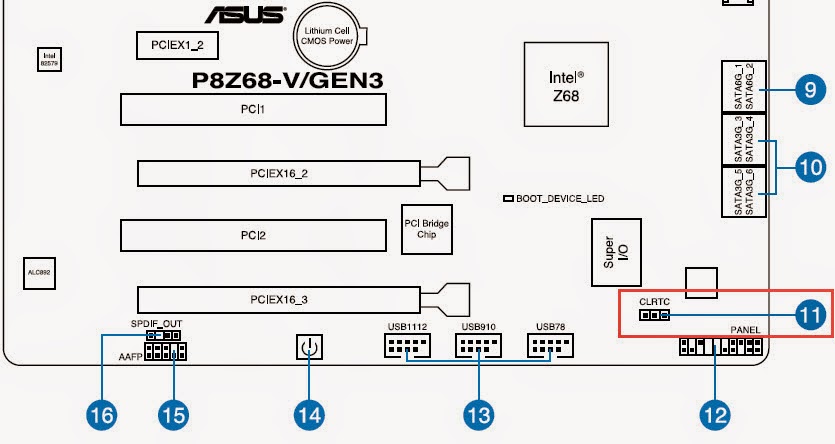
Luckily this motherboard makes it really easy to clear the CMOS via a set of pins named “CLRTC”. You simply need to follow the instructions on page 2-20 of the manual (I did this without reading the manual because it was fairly obvious what had to be done).
 |
| Red box in bottom right hand corner highlights where the jumper is |
 |
| Explanation of clearing the RTC RAM (CMOS) |
Excerpt from page 2-20 of the manual
To erase the RTC RAM:
- Turn OFF the computer and unplug the power cord.
- Move the jumper cap from pins 1-2 (default) to pins 2-3. Keep the cap on pins 2-3 for about 5-10 seconds, then move the cap back to pins 1-2.
- Plug the power cord and turn ON the computer.
- Hold down the <Del> key during the boot process and enter BIOS setup to re-enter data.
10/18/2015 Update
I have been meaning to update this article, I just haven’t had time to do it earlier. This update is to bring to everyone’s attention one gigantic flaw with this motherboard. This is going to sound stupid, but I have tested it and it is the root cause of these symptoms. Clearing the CMOS as stated above does temporarily fix the issue, but you will experience it again on each reboot unless you make sure of the following:
Make sure that between reboots you do not have ANYTHING plugged into the USB 3.0 ports on this motherboard. This includes but is not limited to:
- USB Hubs especially
- Any other physical devices
This is a seemingly random issue, but there is a decent 70% chance that you will experience the slowdown symptoms if you have a device plugged into the USB 3.0 ports.
- I have experienced a few weird issues with a USB hub on my 3.0 ports while the computer is running. I don’t know if this is common or not.
- I have not had any issues with using just an extension cable – extension cables are okay to leave plugged in
- I have not had any issues with using devices such as a microcontroller AFTER my computer is on or plugging in my phone
Conclusion
When this specific Motherboard becomes unresponsive during boot up, even when accessing the UEFI setup, you need to clear the CMOS. Horrifying problem. Definitely obscure if you are not used to seeing these kinds of things happen. This problem scared me so good I basically needed a change of underwear, I am just in no position right now to purchase any new hardware or have to resinstall windows.